SMS
These Programmable SMS API helps you to add robust messaging capabilities to your application . Our web app portal offers a comprehensive suite of SMS features to meet your communication needs. Whether you're sending individual messages, bulk messages, or specialized types of SMS, our platform provides the tools to ensure efficient, secure, and effective communication.
Features
Using SMS API, you can send:
- Bulk SMS
- OTP SMS
- Flash SMS
- SMS with Unicode
- WhatsApp API
Base URL
Headers
- Name
contentType- Type
- string
- Description
This should be set to application/json.
- Name
apikey- Type
- string
- Description
Find your API key under your login account.
Send Single Message
Our web app portal allows you to send individual SMS messages efficiently and securely.
Required Attribute
- Name
sender- Type
- string
- Description
Originator/Alphanumeric ID
- Name
to- Type
- string
- Description
Recipient's MSISDN
- Name
text- Type
- string
- Description
The phone number for the contact.
- Name
type- Type
- string
- Description
Route Type
Use TRANS for Transactional type,
Use PROMO for Promotional type,
Use OTP for OTP type.
Request
{
  "sender": "senderName",
  "to": "91XXXXXXXXXX",
  "text": "Hello World!",
  "type": "TRANS"
}
Response
{
  "id": "58d63c02-XXXX-XXXX-XXXX-XXXXbb39453",
  "data": [
    {
    "recipient": "91XXXXXXXXXX",
    "messageId": "58d63c02-XXXXX-XXXXX-XXXXX-XXXX9bb39453:1"
    }
],
  "totalCount": 1,
  "message": "Message Sent Successfully!",
  "error": null
}
Send OTP SMS
Our web app portal includes a robust feature for sending OTP (One-Time Password) SMS messages. This functionality is crucial for applications requiring enhanced security, such as user authentication, transaction verification, and password resets. The OTP SMS ensures that only the intended recipient can complete the action, adding an extra layer of security to your processes.
Required Attributes
- Name
sender- Type
- string
- Description
Originator/Alphanumeric ID
- Name
to- Type
- string
- Description
Recipient's MSISDN
- Name
text- Type
- string
- Description
The phone number for the contact.
- Name
type- Type
- string
- Description
Route Type
Use TRANS for Transactional type,
Use PROMO for Promotional type,
Use OTP for OTP type.
Request
{
  "sender": "senderName",
  "to": "91XXXXXXXXXX",
  "text": "Hello World!",
  "type": "TRANS"
}
Response
{
  "id": "58d63c02-XXXX-XXXX-XXXX-XXXXbb39453",
  "data": [
    {
    "recipient": "91XXXXXXXXXX",
    "messageId": "58d63c02-XXXXX-XXXXX-XXXXX-XXXX9bb39453:1"
    }
],
  "totalCount": 1,
  "message": "Message Sent Successfully!",
  "error": null
}
Send Bulk SMS
Our web app portal is equipped with a powerful bulk SMS feature designed to facilitate large-scale communication with your audience. This functionality is ideal for marketing campaigns, event notifications, alerts, and any situation where you need to reach multiple recipients simultaneously. With our bulk SMS feature, you can ensure that your message is delivered quickly and efficiently to all intended recipients.
Required attributes
- Name
sender- Type
- string
- Description
Originator/Alphanumeric ID
- Name
to- Type
- string
- Description
Recipient's MSISDN
- Name
text- Type
- string
- Description
The phone number for the contact.
- Name
type- Type
- string
- Description
Route Type
Use TRANS for Transactional type,
Use PROMO for Promotional type,
Use OTP for OTP type.
Request
{
  "sender": "senderName",
  "to": "91XXXXXXXXXX",
  "text": "Hello World!",
  "type": "TRANS"
}
Response
    {
      "id": "58d63c02-XXXX-XXXX-XXXX-XXXXbb39453",
      "data": [
        {
          "recipient": "91XXXXXXXXX1",
          "messageId": "58d63c02-XXXXX-XXXXX-XXXXX-XXXX9bb39453:1"
        },
        {
          "recipient": "91XXXXXXXXX2",
          "messageId": "58d63c02-XXXXX-XXXXX-XXXXX-XXXX9bb39453:2"
        },
        {
          "recipient": "91XXXXXXXXX3",
          "messageId": "58d63c02-XXXXX-XXXXX-XXXXX-XXXX9bb39453:3"
        }
      ],
      "totalCount": 3,
      "message": "Message Sent Successfully!",
      "error": null
    }
Send SMS With Unicode
Our web app portal supports sending SMS messages with Unicode characters, allowing you to communicate in multiple languages and include special characters. This feature is essential for reaching a global audience, ensuring that your messages are accurately represented regardless of the language or symbols used.
Required Attributes
- Name
sender- Type
- string
- Description
Originator/Alphanumeric ID
- Name
to- Type
- string
- Description
Recipient's MSISDN
- Name
text- Type
- string
- Description
The phone number for the contact.
- Name
type- Type
- string
- Description
Route Type
Use TRANS for Transactional type,
Use PROMO for Promotional type,
Use OTP for OTP type.
Optional Attributes
- Name
unicode- Type
- integer
- Description
To specify that themessage to be sent is in unicode format.
Request
{
  "sender": "senderName",
  "to": "91XXXXXXXXXX",
  "text": "Hello World!",
  "type": "TRANS",
  "unicode": 1
}
Response
    {
      "id": "58d63c02-XXXX-XXXX-XXXX-XXXXbb39453",
      "data": [
        {
        "recipient": "91XXXXXXXXXX",
        "messageId": "58d63c02-XXXXX-XXXXX-XXXXX-XXXX9bb39453:1"
        }
 ],
      "totalCount": 1,
      "unicode": 1,
      "message": "Message Sent Successfully!",
      "error": null
}
Send Flash SMS
Our web app portal offers a Flash SMS feature, allowing you to send urgent and high-priority messages that appear directly on the recipient's mobile screen. Unlike regular SMS messages, Flash SMS doesn't get stored in the recipient's inbox by default, making it ideal for time-sensitive alerts, critical notifications, and emergency communications.
Required Attributes
- Name
sender- Type
- string
- Description
Originator/Alphanumeric ID
- Name
to- Type
- string
- Description
Recipient's MSISDN
- Name
text- Type
- string
- Description
The phone number for the contact.
- Name
type- Type
- string
- Description
Route Type
Use TRANS for Transactional type,
Use PROMO for Promotional type,
Use OTP for OTP type.
Optional Attributes
- Name
flash- Type
- integer
- Description
Unique identifier for the contact.
Request
{
  "sender": "senderName",
  "to": "91XXXXXXXXXX",
  "text": "Hello World!",
  "type": "TRANS",
  "flash": 1
}
Response
{
  "id": "58d63c02-XXXX-XXXX-XXXX-XXXXbb39453",
  "data": [
    {
    "recipient": "91XXXXXXXXXX",
    "messageId": "58d63c02-XXXXX-XXXXX-XXXXX-XXXX9bb39453:1"
    }
    "flash": 1
],
  "totalCount": 1,
  "message": "Message Sent Successfully!",
  "error": null
}
Send Template SMS
Our web app portal includes a Template SMS feature designed to streamline and standardize your messaging processes. This functionality allows you to create and use predefined message templates for various scenarios such as promotions, reminders, notifications, and more. With Template SMS, you can ensure consistent communication while saving time on message composition.
Required Attributes
- Name
sender- Type
- string
- Description
Originator/Alphanumeric ID
- Name
to- Type
- string
- Description
Recipient's MSISDN
- Name
text- Type
- string
- Description
The phone number for the contact.
- Name
type- Type
- string
- Description
Route Type
Use TRANS for Transactional type,
Use PROMO for Promotional type,
Use OTP for OTP type.
Optional Attributes
- Name
templateId- Type
- string
- Description
Unique ID of the template
Request
{
  "sender": "senderName"
  "to": "91XXXXXXXXXX"
  "text": "Hello World!"
  "type": "TRANS"
  "templateId" :"templateId"
}
Response
{
  "id": "58d63c02-XXXX-XXXX-XXXX-XXXXbb39453",
  "data": [
    {
    "recipient": "91XXXXXXXXXX",
    "messageId": "58d63c02-XXXXX-XXXXX-XXXXX-XXXX9bb39453:1"
    }
],
  "totalCount": 1,
  "message": "Message Sent Successfully!",
  "error": null
}
Send SMS With Template ID
Our web portal features a send SMS option with a templateId, making your messaging processes more efficient and consistent.
Required Attributes
- Name
sender- Type
- string
- Description
Originator/Alphanumeric ID
- Name
to- Type
- string
- Description
Recipient's MSISDN
- Name
templateId- Type
- string
- Description
Unique ID of the template
- Name
type- Type
- string
- Description
TRANS
- Name
custom- Type
- object
- Description
If the template contains variables, pass a custom parameter value in the array with the number of variables present in the template data. Otherwise, pass the custom parameter with a blank array.
Request
{
  "sender": "AOCAPI",
  "to": "91XXXXXXXXXX",
  "templateId": "150716565XXXXXXXXXX",
  "custom": ["var1","var2"],
  "type": "TRANS"
}
Response
{
  "id": "58d63c02-XXXX-XXXX-XXXX-XXXXbb39453",
  "data": [
    {
      "recipient": "91XXXXXXXXXX",
      "messageId": "58d63c02-XXXXX-XXXXX-XXXXX-XXXX9bb39453:1"
    }
  ],
  "totalCount": 1,
  "message": "Message Sent Successfully!",
  "error": null
}
Send SMS With Short URL
Our web portal features a send SMS option with a Short Url , making your messaging processes more efficient and consistent.
Required Attribute
- Name
sender- Type
- string
- Description
Originator/Alphanumeric ID
- Name
to- Type
- string
- Description
Recipient's MSISDN
- Name
text- Type
- string
- Description
The phone number for the contact.
- Name
type- Type
- string
- Description
TRANS
- Name
shortenUrlData- Type
- object
- Description
This object contains information related to URL shortening functionality. It is designed to enable or configure the shortening of a target URL using the provided options.
Optional Attributes
Request
{
  "sender": "senderName",
  "to": "91XXXXXXXXXX",
  "text": "Thank you for contacting https://az2.in/SENDER/{SORT}",
  "type": "TRANS",
  "shortenUrlData": {
    "shortenUrl": true,
    "targetUrl": [
        "http://5az.me"
    ]
 }
}
Response
{
  "id": "58d63c02-XXXX-XXXX-XXXX-XXXXbb39453",
  "data": [
    {
    "recipient": "91XXXXXXXXXX",
    "messageId": "58d63c02-XXXXX-XXXXX-XXXXX-XXXX9bb39453:1"
    }
],
  "totalCount": 1,
  "message": "Message Sent Successfully!",
  "error": null
}
Webhooks
In this guide, we will look at how to register and consume webhooks to integrate your app. We supports webhooks that can alert you of the following via callback URLs.
- Messages received
- Messages sent (Template & Session)
- Status of the messages sent (Sent/Delivered/read)
SMS Webhooks
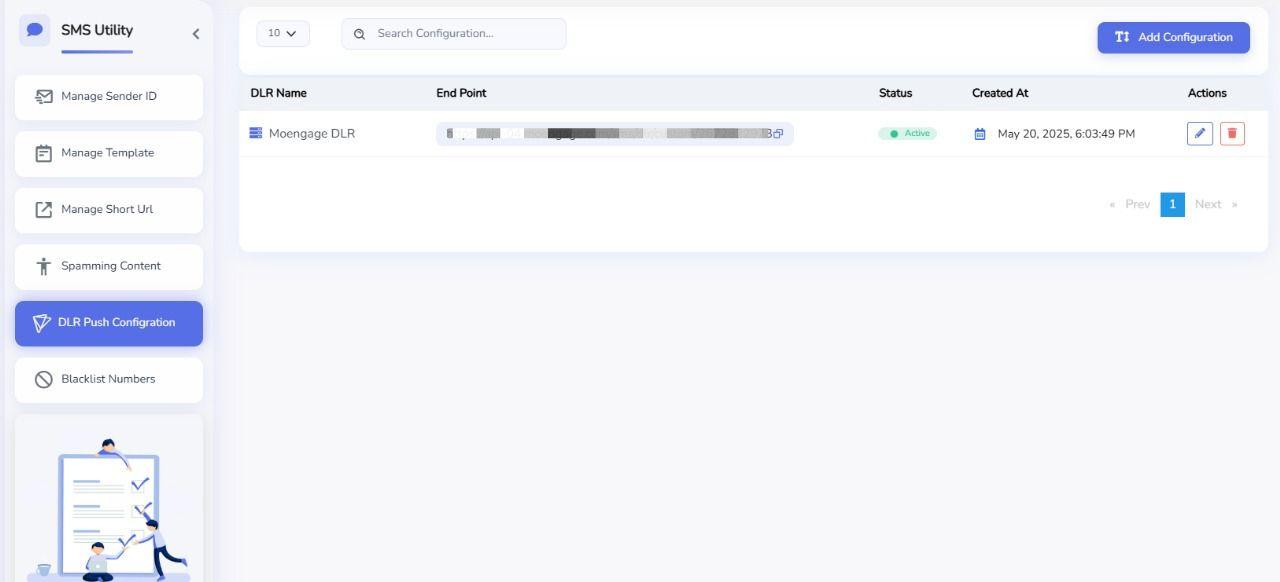
To register a new webhook, you need to have a URL in your app that Protocol can call. You can configure a new webhook from the dashboard under Mesaage app -> Utility Manager -> DLR Push Configuration. Give your webhook a name, pick the events you want to listen for, and add your URL.
How To Add A SMS Webhook
- Click on 'Message app', then click on 'Utility Manager', and choose 'DLR Push Configuration' on the Dashboard.
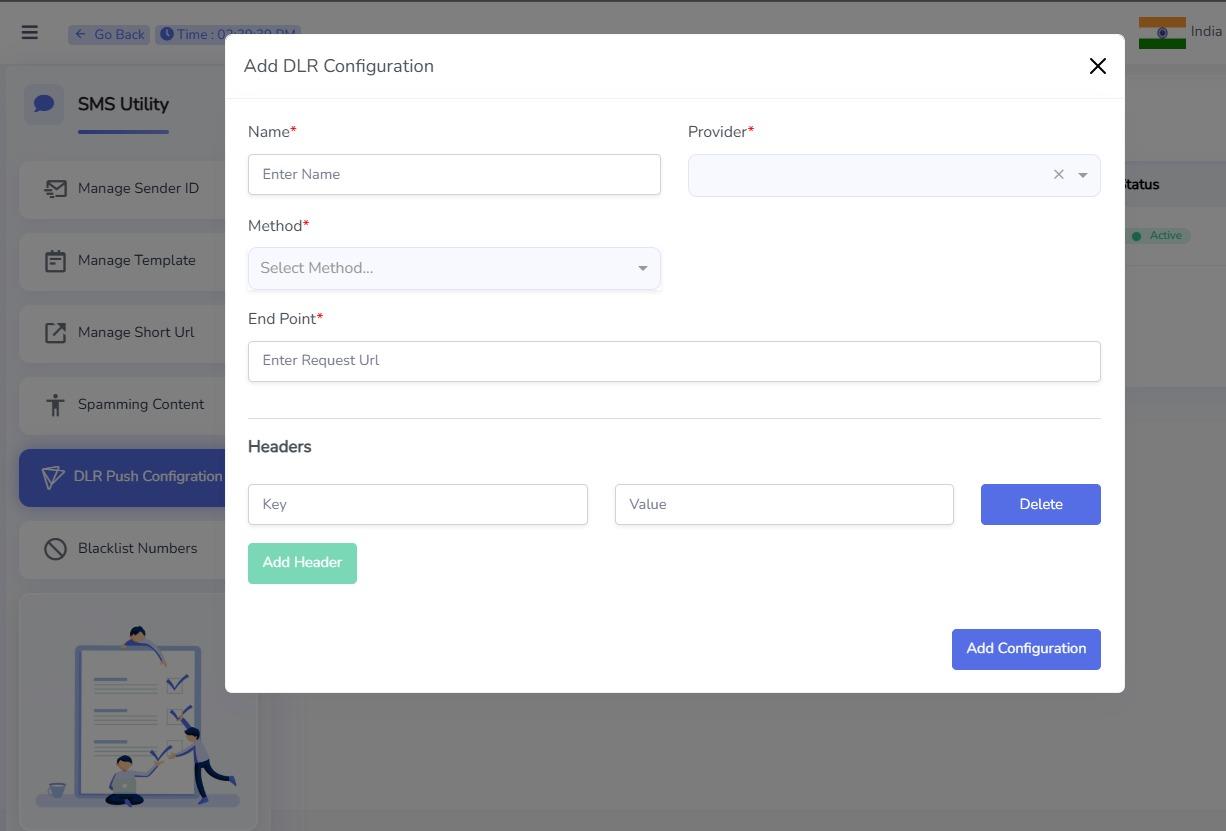
- Click on 'Add Configuration'.
3. Fill In The Required Details
Provide the following information while creating the webhook configuration:
| Field | Description |
|---|---|
| Name | A unique name to identify the webhook configuration. |
| Provider | Select the SMS provider for which this webhook will be used. |
| Method | Select the HTTP method. Typically this should be POST. |
| End Point | Enter the publicly accessible URL where webhook requests will be sent. |
| Headers | Configure the data that should be sent in the webhook request as HTTP headers. |
Configuring Headers
When adding headers, you need to specify a Key and a Value.
-
Header Key can be any custom name defined by your application. For example:
Message-IdMobileStatusSenderX-Message-StatusX-Gateway
-
Header Value must be one of the supported placeholders listed below. At runtime, the placeholder will be replaced with the actual value before the webhook is sent.
Example
| Header Key | Header Value |
|---|---|
Message-Id | {{messageId}} |
Mobile | {{mobileNumber}} |
Status | {{status}} |
Gateway | {{gatewayName}} |
Delivered-Time | {{deliveredDate}} |
For example, if you configure:
| Key | Value |
|---|---|
Message-Id | {{messageId}} |
Status | {{status}} |
The webhook request will contain headers similar to:
Message-Id: 7a4f8cb37a2d
Status: DELIVERED
- Click Add Configuration to save the webhook.
Supported Placeholders
The following placeholders can be used as Header Values. During webhook execution, each placeholder is replaced with its corresponding value.
| Placeholder | Description |
|---|---|
{{messageId}} | Unique message ID assigned to the SMS. |
{{mobileNumber}} | Recipient's mobile number. |
{{messageCredit}} | Number of SMS credits consumed. |
{{gatewayName}} | SMS gateway through which the message was sent. |
{{senderName}} | Sender ID used to send the SMS. |
{{errCode}} | Error code returned by the gateway or operator, if applicable. |
{{deliveredDate}} | Date and time when the SMS was delivered. |
{{status}} | Current delivery status (e.g., DELIVERED, FAILED, PENDING). |
{{operatorCircle}} | Telecom operator and service circle of the recipient. |
{{createdAt}} | Date and time when the SMS was submitted. |
{{statusDescription}} | Detailed description of the delivery status or failure reason. |
SMS Webhook Request Examples For Single Object
The SMS webhook can be configured to send delivery reports using either the GET or POST HTTP method.
Get Request
When GET is selected, the delivery report is sent as query parameters.
GET https://api-03.moengage.com/sms/dlr/custom/3227454402?messageId=23b475e2-b522-4863-b68e-a465623b1b75%3A1&mobileNumber=919999690355&senderName=PLCKWK&errCode=000&status=Delivered&createdAt=1782475943819&deliveredDate=Fri%20Jun%2026%202026%2017%3A42%3A25%20GMT%2B0530%20(India%20Standard%20Time)&statusDescription=Delivered
Post Request
When POST is selected, the delivery report is sent in the request body as JSON.
{
  "messageId": "1b0bcd2b-1fe6-4c14-978d-b5854f9159c5:1",
  "mobileNumber": "917478149843",
  "senderName": "STYBZR",
  "errCode": "000",
  "status": "Delivered",
  "createdAt": "1782475943819",
  "deliveredDate": "Fri Jun 26 2026 17:40:00 GMT+0530 (India Standard Time)",
  "statusDescription": "Delivered"
}
Note: The fields included in the GET query parameters or POST JSON body depend on the placeholders configured in your webhook settings. Any supported placeholder can be included, and its value will be dynamically replaced when the webhook is triggered.