RCS Webhooks
RCS Webhooks allow your application to receive real-time callbacks whenever a user interacts with your RCS Business Agent or when the status of an outbound message changes.
To register a new webhook, configure a new webhook from the dashboard under RCS → Utility → Webhook. Give your webhook a name, choose the events you want to receive, and provide your callback URL.
How To Add An RCS Webhook
- Click on RCS, then select Utility, and choose Webhook from the Dashboard.
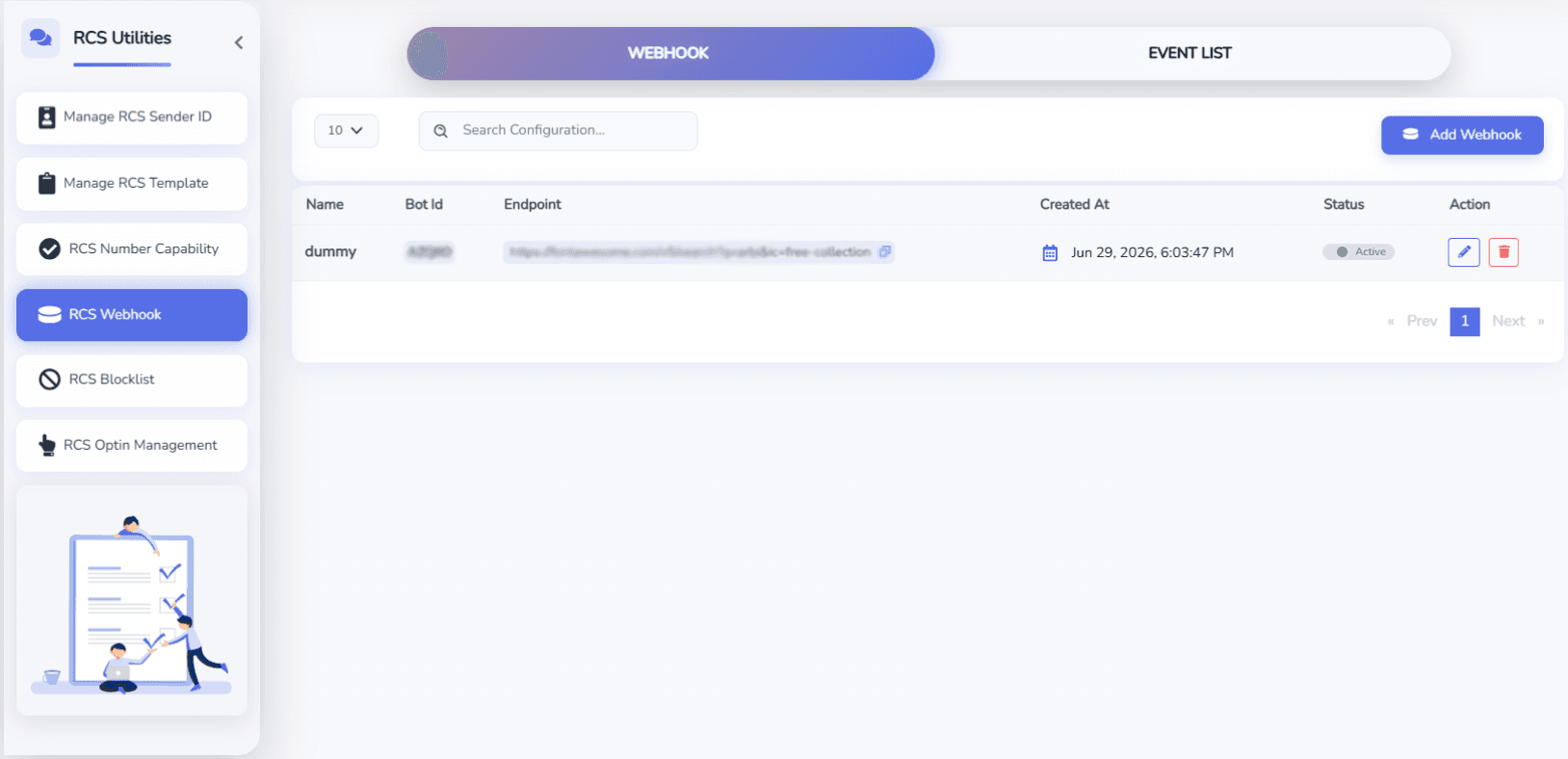
- Click Add Webhook.
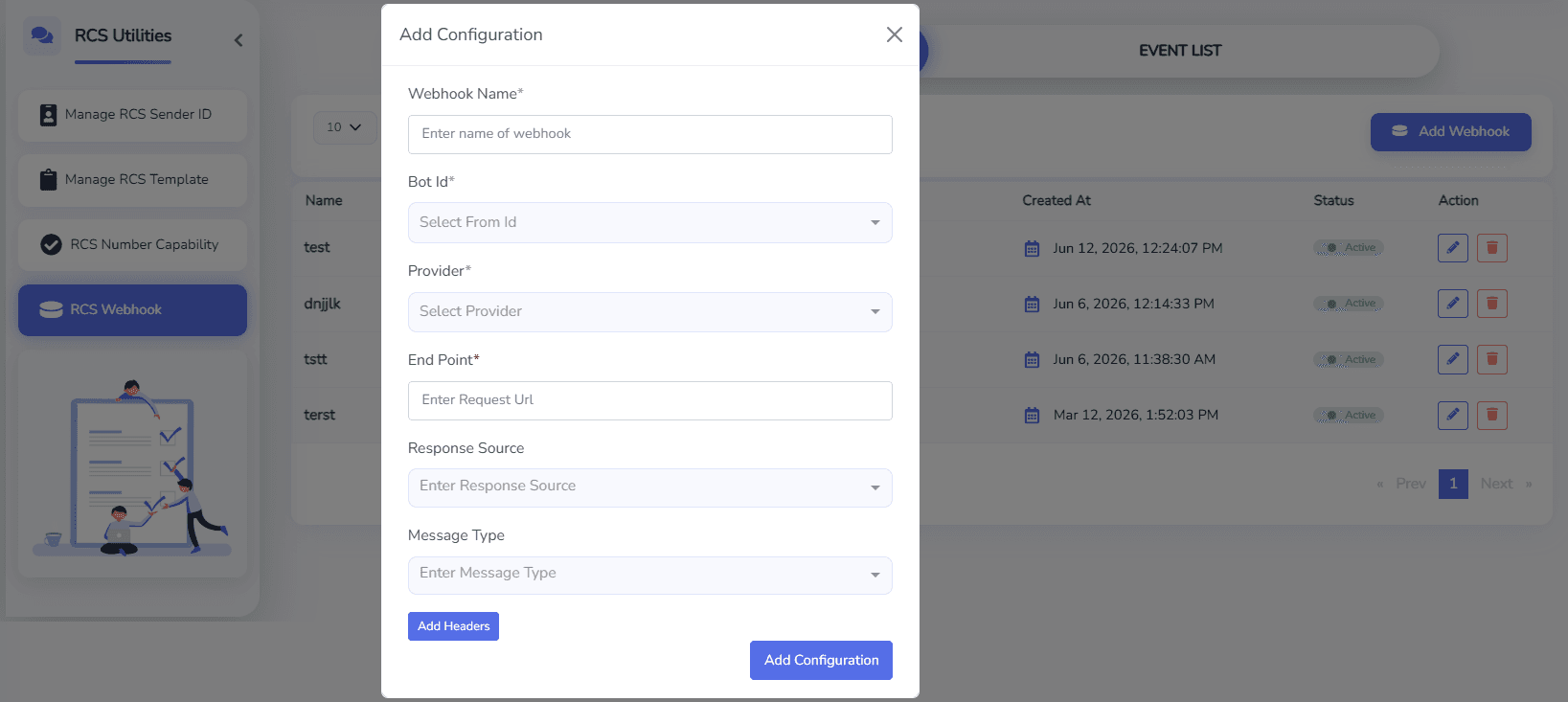
- Enter the following details:
- Name – A unique name for the webhook.
- Method – HTTP Method (POST).
- End Point – Your publicly accessible webhook URL.
- Events – Select the RCS events that you want to receive.
- Click Add Webhook to save the configuration.
Sample Webhook Requests
The following examples show the webhook payloads that your application may receive.
Replace the webhook URL with your own endpoint.
User Text Message
curl -X POST "https://your-domain.com/rcs/webhook" \
-H "Content-Type: application/json" \
-d '{
  "botId":"Brand BotId",
  "channel":"rcs",
  "event":"user_message",
  "message":{
    "suggestionResponse":null,
    "text":"Reply",
    "userFile":null
  },
  "messageId":"880be396-0b83-4cc0-8b79-0a259daff1e5:1",
  "timestamp":1782471254312,
  "userPhoneNumber":"+919999999999"
}'
Action URL Callback
curl -X POST "https://your-domain.com/rcs/webhook" \
-H "Content-Type: application/json" \
-d '{
  "botId":"Brand BotId",
  "channel":"rcs",
  "event":"user_message",
  "message":{
    "suggestionResponse":{
      "plainText":"Button Label",
      "postBack":{
        "data":"Your postdata"
      },
      "type":"ACTION"
    },
    "text":"",
    "userFile":null
  },
  "messageId":"53282600-4563-4cf4-94c0-680895481b2b:1",
  "timestamp":1782471183264,
  "userPhoneNumber":"+919999999999"
}'
Reply Button Callback
curl -X POST "https://your-domain.com/rcs/webhook" \
-H "Content-Type: application/json" \
-d '{
  "botId":"Brand BotId",
  "channel":"rcs",
  "event":"user_message",
  "message":{
    "suggestionResponse":{
      "plainText":"Yes",
      "postBack":{
        "data":"YES_CLICKED"
      },
      "type":"REPLY"
    },
    "text":"",
    "userFile":null
  },
  "messageId":"6b4e01d2-5b26-48c9-b879-1efaf08c4b01:1",
  "timestamp":1782471254312,
  "userPhoneNumber":"+919999999999"
}'
Dialer Callback
curl -X POST "https://your-domain.com/rcs/webhook" \
-H "Content-Type: application/json" \
-d '{
  "botId":"Brand BotId",
  "channel":"rcs",
  "event":"user_message",
  "message":{
    "suggestionResponse":{
      "plainText":"Call Now",
      "postBack":{
        "data":"+911234567890"
      },
      "type":"DIALER"
    },
    "text":"",
    "userFile":null
  },
  "messageId":"f0a6f7b4-c7a4-4709-b9f8-04e46bcfd911:1",
  "timestamp":1782471254312,
  "userPhoneNumber":"+919999999999"
}'
Message Sent
curl -X POST "https://your-domain.com/rcs/webhook" \
  -H "Content-Type: application/json" \
  -d '{
    "botId": "Brand BotId",
    "channel": "rcs",
    "event": "message_status",
    "messageId": "d8f513e9-7a5d-4356-99cd-a3a54660691a:1",
    "statuses": {
      "eventId": "MxV08D0IpdSJe7w207IxOEOQ",
      "status": "sent",
      "timestamp": 1782471167
    }
  }'
Message Delivered
curl -X POST "https://your-domain.com/rcs/webhook" \
-H "Content-Type: application/json" \
-d '{
   "botId": "Brand BotId",
  "channel": "rcs",
  "event": "message_status",
  "messageId": "d8f513e9-7a5d-4356-99cd-a3a54660691a:1",
  "statuses": {
    "eventId": "MxV08D0IpdSJe7w207IxOEOQ",
    "status": "delivered",
    "timestamp": 1782471167
  }
}'
Message Read
curl -X POST "https://your-domain.com/rcs/webhook" \
-H "Content-Type: application/json" \
-d '{
 "botId": "Brand BotId",
  "channel": "rcs",
  "event": "message_status",
  "messageId": "d8f513e9-7a5d-4356-99cd-a3a54660691a:1",
  "statuses": {
    "eventId": "MxV08D0IpdSJe7w207IxOEOQ",
    "status": "read",
    "timestamp": 1782471167
  }
}'
Message Failed
curl -X POST "https://your-domain.com/rcs/webhook" \
  -H "Content-Type: application/json" \
  -d '{
     "botId": "Brand BotId",
  "channel": "rcs",
  "event": "message_status",
  "messageId": "d8f513e9-7a5d-4356-99cd-a3a54660691a:1",
  "statuses": {
    "eventId": "MxV08D0IpdSJe7w207IxOEOQ",
    "status": "failed",
    "timestamp": 1782471167
  }
  }'
Message Status Event
| Status | Description |
|---|---|
sent | The message has been accepted by the RCS platform and sent for delivery. |
delivered | The message has been successfully delivered to the recipient's device. |
read | The recipient has opened and read the message. |
failed | The message could not be delivered to the recipient. |
Event Descriptions
| Event | Description |
|---|---|
user_message | Triggered whenever a user sends a message or interacts with your RCS Business Agent. |
ACTION | User tapped an Action URL suggestion. |
REPLY | User selected a Reply Button suggestion. |
DIALER | User tapped a Call Button suggestion. |
text | User sent a text message. |
suggestionResponse | Contains the information about the suggestion button selected by the user. |
location | User shared their location. |
userFile | User uploaded a file, image, video, or audio attachment. |